Open source · MIT · Electron desktop app

Workspaces for the
AI-powered terminal era.

strIDEterm organizes your shells, SSH sessions, AI coding agents, code reviews, Git, and Docker into focused workspaces — and orchestrates supervised, multi-agent Worker + Judge coding loops across Claude Code, Codex, Gemini, GitHub Copilot, and OpenCode, started by hand, on a schedule or by a pull request.

strIDEterm — acme-api · live demo Live

Live demo with a sample workspace — click in and try the agents, Git, Files and the Worker + Judge task. Nothing you type is executed. Sample workspace — nothing you type is executed. Try Notes ↗ Open full screen ↗

Claude Code· Codex CLI· Gemini CLI· GitHub Copilot CLI· OpenCode· Lazygit· Docker· SSH· Jira· Telegram· Claude Code· Codex CLI· Gemini CLI· GitHub Copilot CLI· OpenCode· Lazygit· Docker· SSH· Jira· Telegram·
Headline · Agent Task Runner

A Worker writes the code.
An independent Judge reviews it.

The Agent Task Runner orchestrates two AI coding agents in a supervised agentic loop. Pick any two of Claude Code, Codex, Gemini, GitHub Copilot, or OpenCode for the two roles. The runner runs deterministic checks between rounds, and a task counts as done only when the Judge says “complete”.

Worker claude-code
▸ implements task from TASK.md
▸ commits locally for the Judge
▸ runs verification checklist
Built-in checks
✓ WORK_LOCK released
✓ TODO checklist clear
✓ npm audit (lockfile)
Judge codex
▸ reviews git diff + task
▸ rules continue or complete
▸ shower-mode context refresh
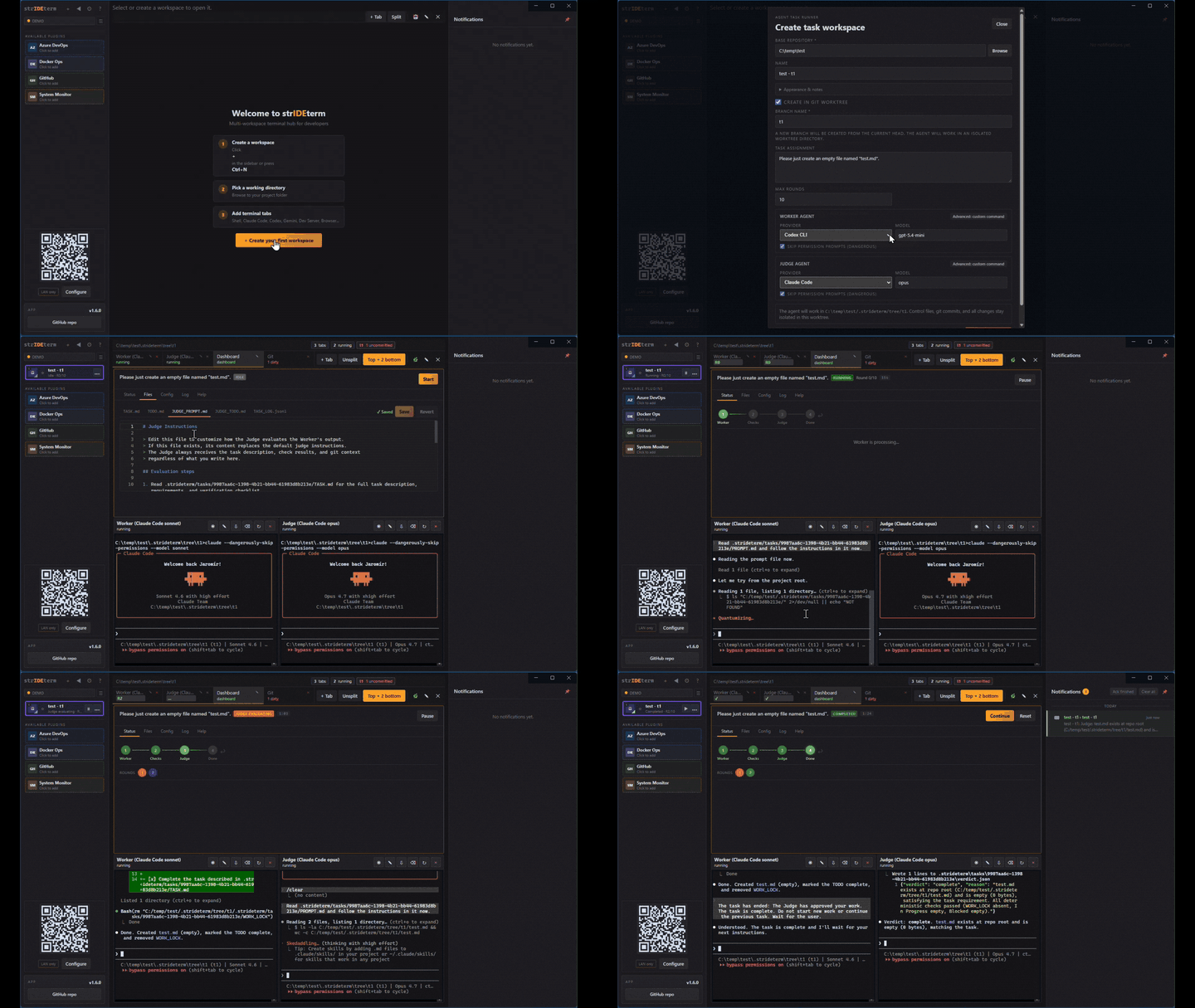
Agent Task Runner — recorded demo Demo
Animated demo of the Agent Task Runner cycling through Worker, checks, and Judge across rounds
Recorded session — Worker codes, deterministic checks run, Judge reviews the diff, loop continues until the Judge says complete.
▸

Mix providers. Claude worker + Codex judge. Or Gemini + Copilot. Pick per task.

▸

Skip-permissions toggles per role. Sensible defaults; full control via picker or custom CLI.

▸

Verification built in. The Worker is told to run your project’s own checks before finishing; steps in your brief take precedence.

▸

Dashboard tab. Round-by-round progress with check results and judge feedback.

▸

Shower mode. Periodic context refresh keeps long tasks coherent.

▸

Optional git worktree. Each task lives on its own branch — no contamination.

▸

Prepared from a planning terminal. Claude Code, Codex, Copilot or OpenCode can draft and monitor a task over internal MCP — nothing starts until you approve it.

▸

Interrupted? Pick it back up. Tasks that were running when the app closed are offered on the next launch: Resume, Restart or Skip.

Automations · Isolation

Agents that run on their own, and stay in their lane.

Put an agent or a Worker + Judge task on a schedule — down to a cron expression — or let a pull request, a failed check or a Jira issue start it, then keep it inside a sandbox so unattended work cannot wander through the rest of your machine.

Automations

Run an agent or a Worker + Judge task on a schedule, or when something happens in GitHub, Azure DevOps or Jira. Every automation gets its own child workspace with a Dashboard.

  • Schedules: every N minutes, once, daily, selected days or cron — with a Missed runs policy, Skip or Run once.
  • Events: a pull request on GitHub or Azure DevOps is opened, updated, merged or closed, gets a comment or a vote, or a check on it fails or finishes — filtered by repository, role and target branch; or an issue enters, leaves or changes in a saved Jira query.
  • Ask your agent: with internal MCP allowed, the workspace’s agent can set up and adjust its automations for you; every change shows in Notification Center.
  • Checkout: the parent workspace, or a new worktree on its own branch.
  • PR reviews run in a separate review checkout and save local drafts — a person inspects and publishes them.
  • Control: Run now, Stop, Disable, run history and a RESULT.md summary per run; pause everything at once.
  • Heads-up: Notification Center, Telegram and mobile. After five failures in a row an automation disables itself.

strIDEterm has to be running for schedules and event polling.
Work in isolation

Tick Work in isolation in the workspace settings and its agents run in a sandbox. The agent works on your project as usual; the rest of your computer stays out of reach.

  • Reads only the workspace folder — not your home folder or other drives.
  • Writes only to the workspace and its own working folders; it cannot change Git hooks, editor settings or your agent configuration.
  • Network only through strIDEterm, which asks before the agent reaches anything new. No answer in time means refused.
  • No tokens: strIDEterm signs in to private Maven, npm, pip and Gradle registries for the agent.
  • Inherited by tasks and automations; isolated tabs carry an isolated label.
  • Where it runs: inside WSL2 on Windows, on your Mac on macOS, and on Linux with bubblewrap, socat and ripgrep.

Not covered: the workspace contents themselves, the agent’s own sign-in, and its traffic to its model.

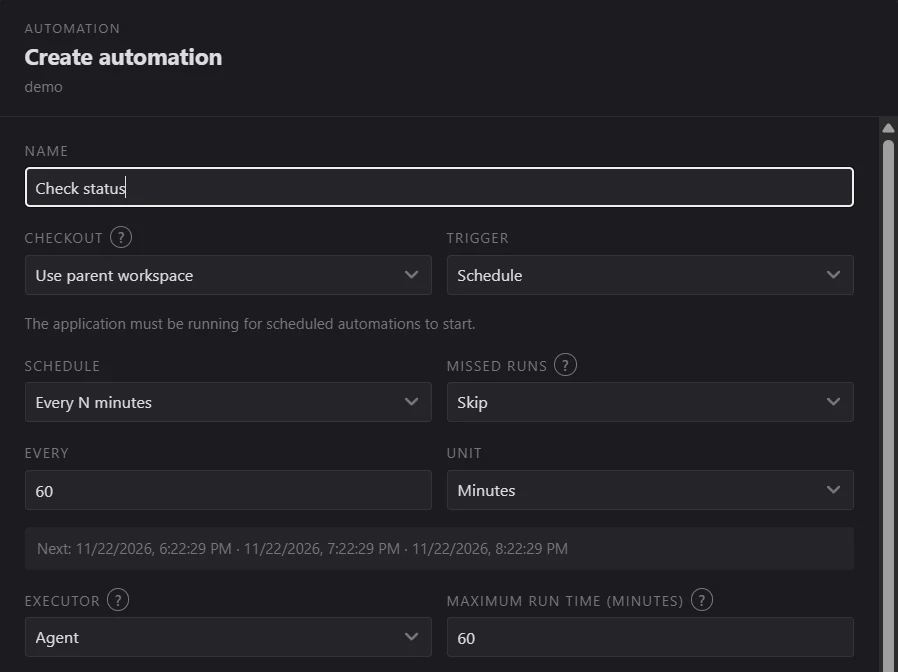
Create automation · schedule
The Create automation dialog of strIDEterm 3.4.3: name, checkout in the parent workspace, a schedule trigger every 60 minutes with the Skip policy for missed runs and the next three run times, and an agent executor with a 60-minute limit
Workspaces & Tabs

One window. Every project.

Each workspace has its own terminal tabs, working directory, and settings. Add tabs from a template menu — Shell, Claude Code, Codex, Gemini CLI, GitHub Copilot, Dev Server, Files, and other presets.

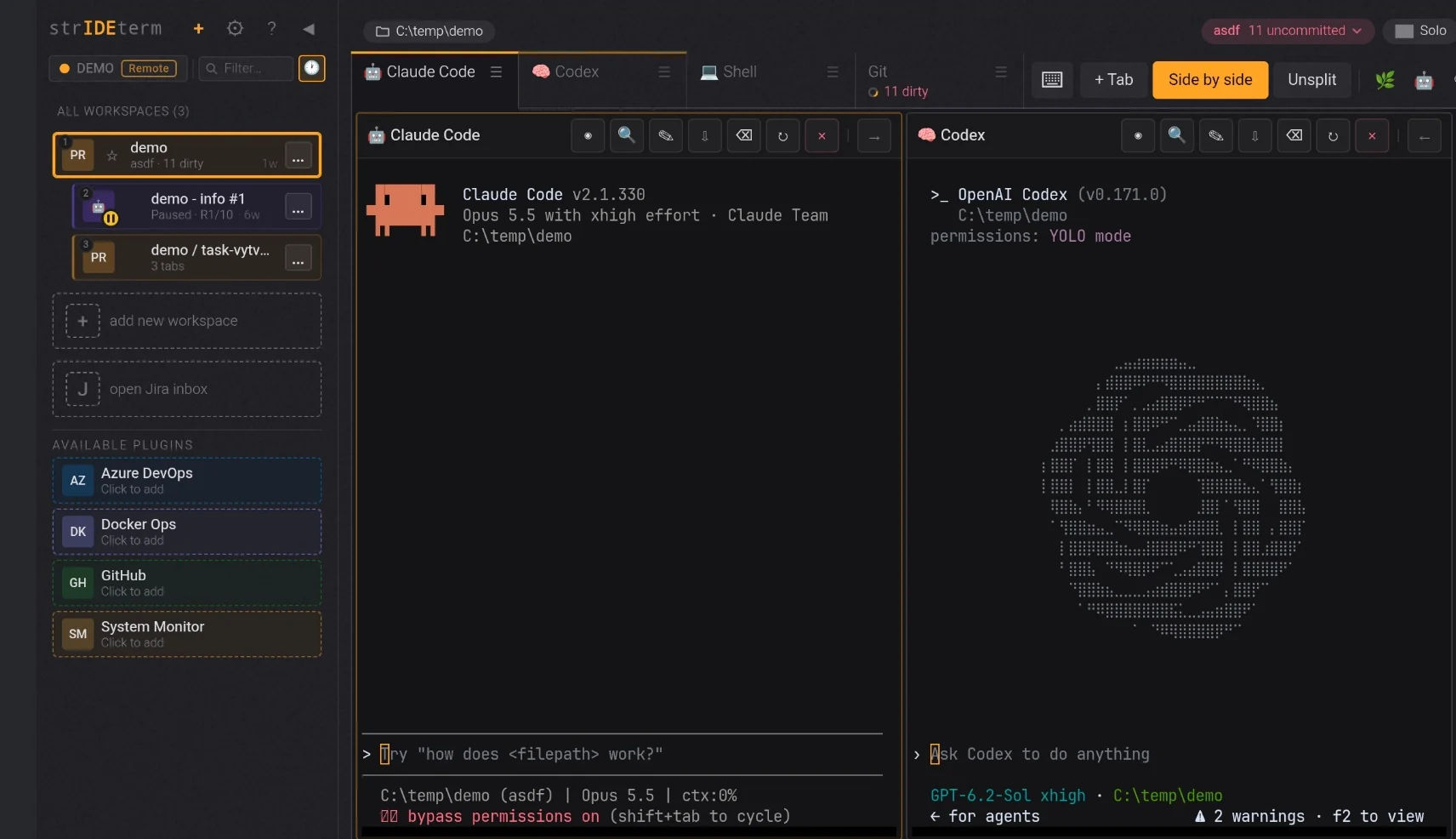
Side by side · Claude Code and Codex
A strIDEterm workspace with Claude Code and Codex side by side, the workspace list and available plugins in the sidebar
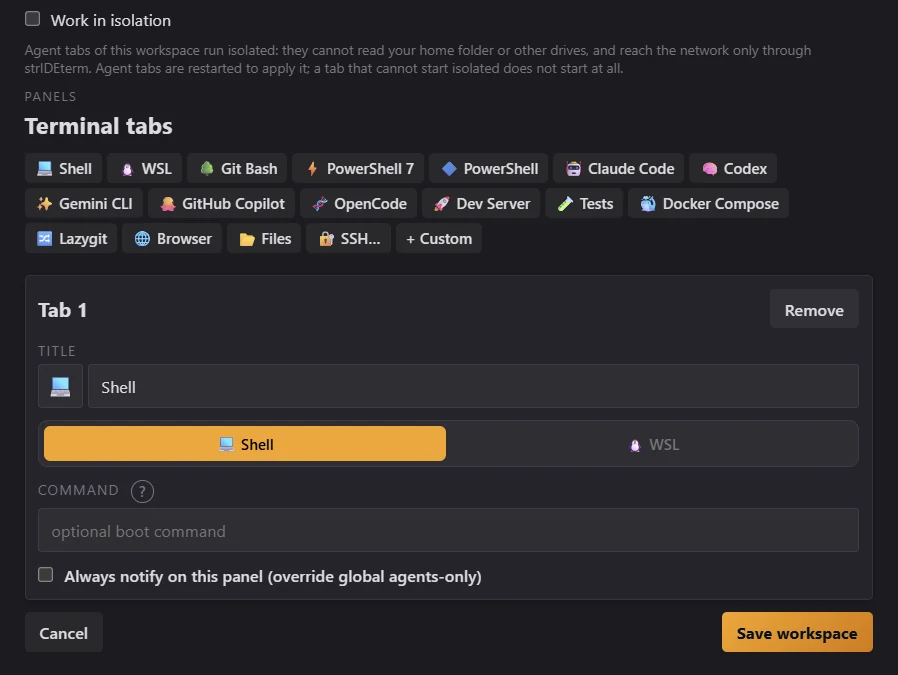
Add workspace · tab templates
Part of the Add workspace dialog: the Work in isolation option and the Terminal tabs presets — Shell, WSL, Git Bash, PowerShell 7, PowerShell, Claude Code, Codex, Gemini CLI, GitHub Copilot, OpenCode, Dev Server, Tests, Docker Compose, Lazygit, Browser, Files, SSH and Custom
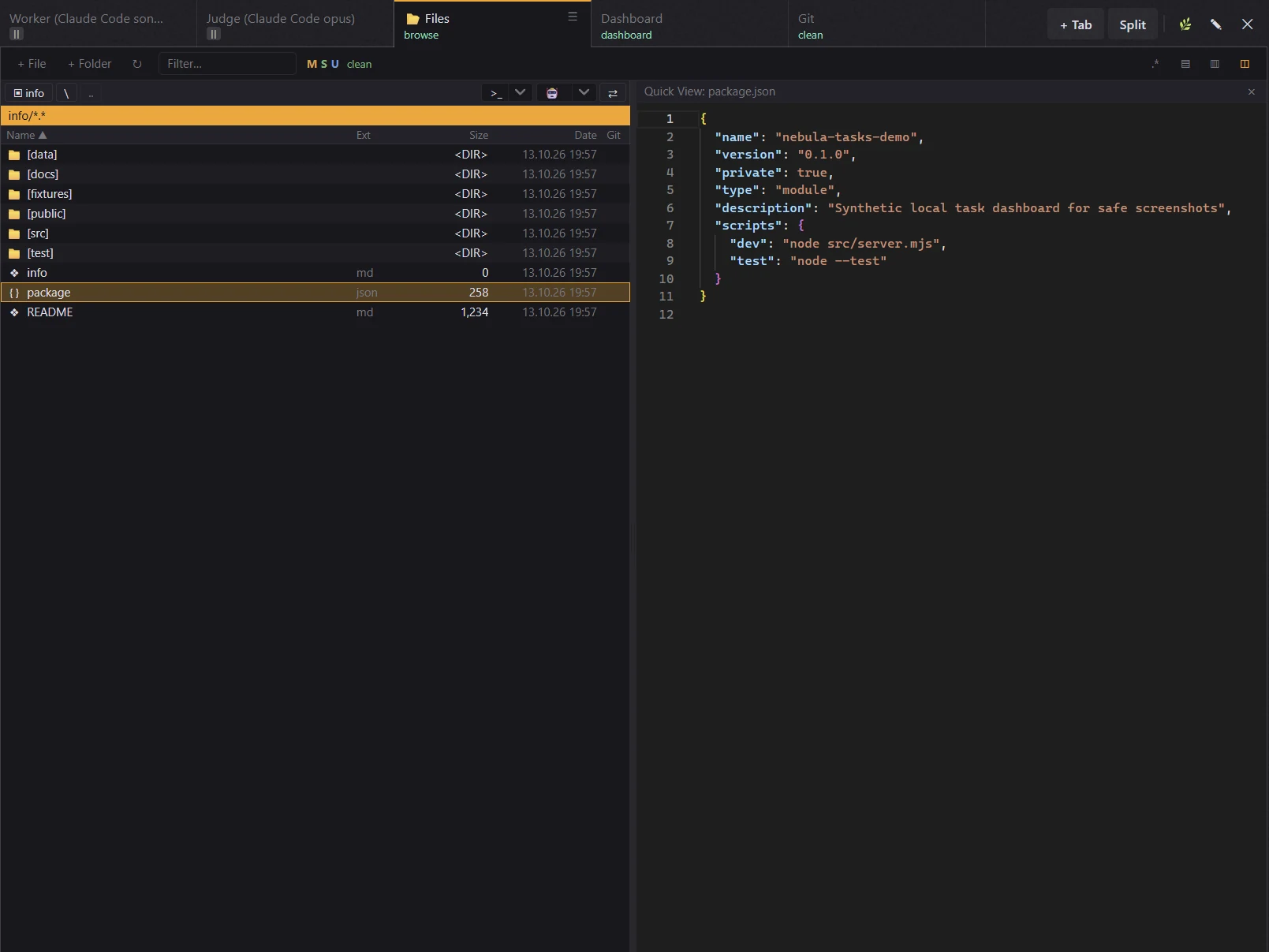
Files · quick view
The Files tab: a folder listing with sizes, dates and Git status next to a quick view of package.json
▸Tab templates. One-click presets for every supported AI CLI plus shell, dev server, file manager, and embedded browser.
▸Profiles. Switch the entire workspace set between Work, Personal, or Client — colored profile bar tells you which.
▸Split layouts. Solo, columns, rows, top-split, left-split, or grid — see multiple terminals side by side.
▸File manager. Tree, preview, edit, copy/rename/delete via right-click. Resizable panels.
▸Drag & drop. Reorder workspaces and tabs by dragging.
Code review & issues

PR and issue inboxes that turn into working branches.

One click on a pull request opens a managed review workspace — repository cloned, worktree checked out, AI agent tabs ready. For GitHub and Azure DevOps. Jira issues work the same way: start development and get a branch workspace with the issue’s files and an agent.

GitHub PR review

  • Inbox grouped by repo · All / Needs attention / Needs review / My PRs
  • Worktree per PR at {reviewRoot}/reviews/{connection}/pr-{number}/
  • Approve, Request changes, or Comment from the workspace
  • New-branch flow → push → open PR from the same workspace
  • MCP bridge so AI agents can review and fix in-place
Try the GitHub demo ↗

Azure DevOps PR review

  • Inbox grouped by repo with managed review workspaces
  • AI agent integration — review & fix loop, push & publish
  • MCP bridge for agent-driven comments and approvals
  • Same architecture as the GitHub integration
Try the Azure DevOps demo ↗

Jira

  • Jira Cloud and Data Center — search, Board, saved queries and My issues
  • Comment and change status; every change is previewed and confirmed before it is sent
  • Start development → branch workspace with the issue in .strideterm/jira/<KEY>/ and an agent: Analyze first or Implement
  • Header search with To Do / In Progress counters
  • Jira MCP for agents: read issues, propose comments — only you post them
  • Saved queries checked in the background; usable from the remote UI and your phone
Git that scales to microservices

Group sibling repos under one workspace.

Set gitRoots on a workspace and the Git pane gets a repo switcher plus a Bulk sub-tab — Fetch all and Pull all (ff-only) across every repo with per-row status. Single-repo behavior stays unchanged when gitRoots is empty.

⎇

Branch & status

Branch info, dirty count, commit log, and one-click Lazygit launch on every workspace.

⌘

Worktrees

Create a worktree from any project — task workspaces and PR reviews use them automatically to isolate work on its own branch.

⇋

Bulk fetch / pull

Iterate across every repo in a workspace — see per-row OK / fast-forward / dirty status without leaving the pane.

api-gateway↻ ff-only
auth-service↻ up to date
billing-svc! local changes
notifications↻ ff-only
Remote control

Drive your workspace from anywhere.

Open a workspace from a phone, a tablet, or another computer’s browser — on your LAN or through an opt-in Cloudflare Quick Tunnel, with token auth and a QR handoff. The remote web UI is mobile-responsive, and Telegram carries alerts and takes your replies. Try the remote UI right here, with sample data.

Remote Access

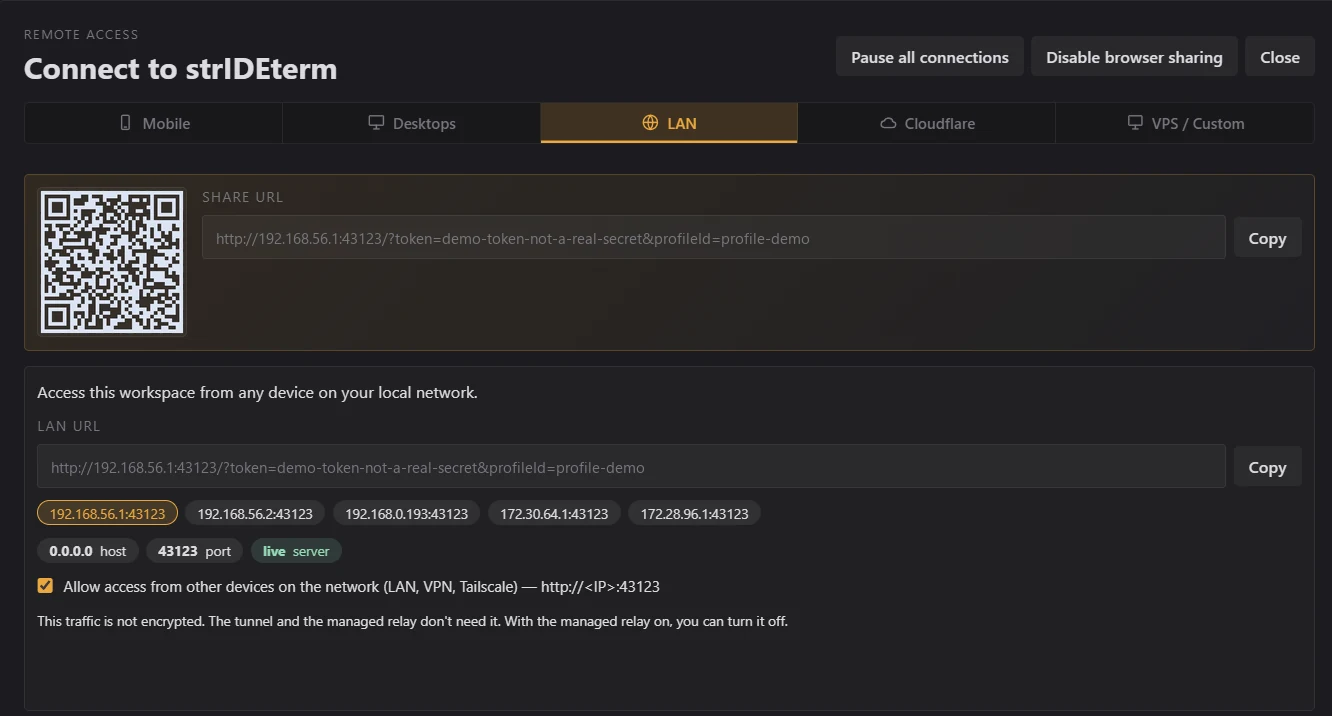
HTTP / WebSocket bridge. LAN by default, opt-in to Cloudflare tunnel for cross-network. Token-based auth, QR code for quick handoff — both shown in the share dialog below.

strIDEterm 3.4.3 Remote Access dialog on the LAN tab: share URL with its QR code and the LAN addresses (token and QR code anonymized)

Telegram bot

Long-polling — no public webhook. Reply to alerts, tap inline buttons, or use slash commands (/menu, /status, /task, /screenshot). Bot token sealed in the OS keychain; chat-ID allowlist on every update.

Try the remote UI

A sample workspace in your browser. Nothing you type is executed.

▶ Open the live demo

Sample workspace — nothing you type is executed. Open full screen ↗

Android · Google Play

strIDEterm Mobile, the app for your phone

A push the moment an agent needs you, task control, PR reviews, the remote UI with its terminals, and files and dictated prompts sent straight into a workspace. Paired to your desktop by QR, end-to-end encrypted.

14 days free · no payment card · the desktop app stays free

QR code that opens strIDEterm Mobile on Google Play
Scan to open Google Play
SSH

Your agents, on your servers.

Run Claude Code or Codex on the machine where the code and the data live, and keep it one tab away in your local workspace, right next to your local shells and agents.

Agents that live on the server

Start Claude Code or Codex in an SSH tab: a saved host can run a startup command such as tmux new -A -s work right after login. Inside tmux the agent keeps working when you close strIDEterm, and when you open the tab again you are back in the same session.

Files and running sessions

Browse files (SFTP) opens a file browser for a Built-in SSH host in its own tab: upload and download with progress, speed and cancel, and the result lands in the Notification Center. Attach to tmux… lists the running sessions, previews their recent output, and attaches Interactive or Read-only; detach and the session keeps running on the host.

Your local agents can reach it too

Tick SSH tools for this tab on a local Claude Code or Codex tab and strIDEterm’s built-in MCP server lets the agent look up your saved hosts and run commands on them: tail a log, restart a service, run the tests on the box. It never sees a key or a password.

Check in from anywhere

The same SSH tabs show up in strIDEterm’s remote web UI, so you can see what the agent on your server is doing from your phone. The desktop app has to be running, because the remote UI connects through it.

All SSH features

Connect

  • Saved host book with tags, plus Quick connect
  • Built-in client, your system ssh, or OpenSSH in WSL (Windows)
  • Jump hosts (ProxyJump) and keepalive
  • Test connection, without opening a tab or saving anything
  • Host aliases from ~/.ssh/config
  • SFTP file browser tab (Built-in client): upload, download, rename, delete
  • Attach to a running tmux session, interactive or read-only

Sign in

  • Private keys
  • SSH agent: Pageant, Windows OpenSSH agent, or a Unix socket
  • Password and multi-round MFA
  • Key manager: ed25519, ECDSA and RSA keys, OpenSSH certificates
  • One-click “Transfer public key” (built-in client)
  • Agent forwarding per host, off by default

Security

  • Host-key check with old and new fingerprint when a key changes (built-in client); system ssh and WSL use their own known_hosts
  • Private keys encrypted by the OS key store (DPAPI, Keychain, libsecret or kwallet); plaintext refused by default
  • Importing never modifies files in ~/.ssh
  • MCP tools: built-in-client hosts only, 60 s timeout, 128 KB output cap
  • Agents list, upload and download files only between the host and their own workspace folders, never into .git

Finish notifications that actually fire

Audio ding when focused, system notification in background. Per-provider hook integration with Claude Code, Gemini CLI, Codex CLI, GitHub Copilot CLI, and OpenCode — instant signals when an agent stops or asks for input. OSC 133 shell integration auto-injected for bash, zsh, and PowerShell.

Questions are told apart from idle waiting. A permission prompt gets its own sound and a toast that names what is being approved. Optional auto-approve for Claude Code is off by default and records every decision in an audit log; it never answers AskUserQuestion or ExitPlanMode, skips task workspaces, and cannot be switched on from a remote client.

ClaudeGeminiCodexCopilotOpenCode
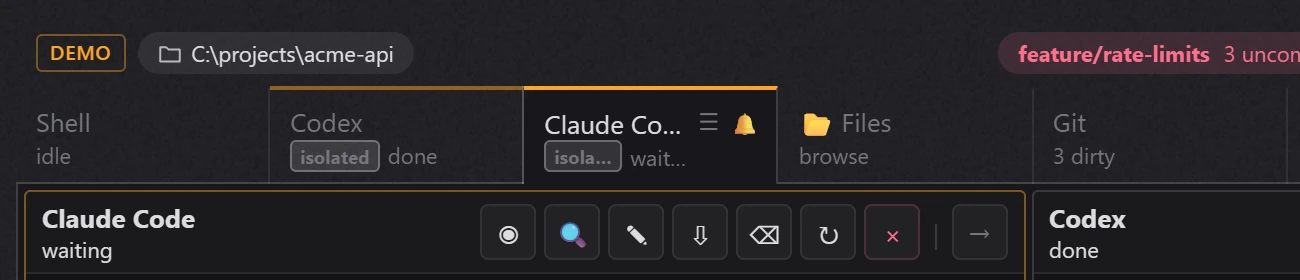
Tab status in a workspace: Claude Code waiting with a bell, Codex done, Shell idle, Files and Git (demo data)
Plus everything else

The rest of the toolbelt

⎈PluginsManifest-based extension system. Docker Ops & System Monitor built in.
◐Light & dark themeIncluding terminal colors and title bar.
⌨Keyboard shortcutsWorkspaces, tabs, layouts — fully mouse-free.
▤Embedded browserOpen URLs in a tab with a URL bar & nav controls.
⊞Multiple instancesRun side-by-side via --data-dir.
⚙State at ~/.strideterm/JSON state, structured logs, user plugins.
🐳Docker OpsList containers, run actions, open shells, stream logs.
📈System MonitorBuilt-in plugin for at-a-glance system status.
↻In-app updatesLinux AppImage: download in Settings → About, then Restart and install. The Microsoft Store updates its own copy; other builds update from a new release.
☝Select text by touchLong-press the terminal for a snapshot you can select and copy on a phone.
🔔Notification CenterAutomation results, SFTP transfers, Jira updates and isolation requests in one place.
∅No account neededLocal terminals, agents, LAN access and Cloudflare Quick Tunnel are free; only hosted Mobile services need a subscription.
Get started

Download strIDEterm

Pre-built installers for every major platform. Nightly builds from master on the Releases page.

Outside the Microsoft Store the installers are not code-signed yet. Windows SmartScreen asks once: More info → Run anyway. On macOS, allow the app in System Settings → Privacy & Security → Open Anyway, or clear the quarantine flag with xattr -dr com.apple.quarantine /Applications/strIDEterm.app.

Quick install

VER=$(curl -fsSL https://api.github.com/repos/jstradej/strideterm/releases/latest \
  | grep -m1 '"tag_name":' | cut -d'"' -f4 | sed 's/^v//')
curl -fL -o strIDEterm.AppImage \
  "https://github.com/jstradej/strideterm/releases/latest/download/strIDEterm-${VER}.AppImage"
chmod +x strIDEterm.AppImage && ./strIDEterm.AppImage
VER=$(curl -fsSL https://api.github.com/repos/jstradej/strideterm/releases/latest \
  | grep -m1 '"tag_name":' | cut -d'"' -f4 | sed 's/^v//')
curl -fL -o strIDEterm.dmg \
  "https://github.com/jstradej/strideterm/releases/latest/download/strIDEterm-${VER}-mac-arm64.dmg"
open strIDEterm.dmg
$ver = (Invoke-RestMethod https://api.github.com/repos/jstradej/strideterm/releases/latest).tag_name.TrimStart('v')
Invoke-WebRequest -Uri "https://github.com/jstradej/strideterm/releases/latest/download/strIDEterm-Setup-$ver.exe" -OutFile strIDEterm-Setup.exe
Start-Process .\strIDEterm-Setup.exe

All snippets resolve the latest release tag from the GitHub API and download the matching artifact.

FAQ

Questions, answered

What strIDEterm is, the AI coding agents it orchestrates, and how the supervised Worker + Judge loop runs.

What is strIDEterm?

strIDEterm is an open-source (MIT) desktop app that turns the terminal into a workspace. It organizes your shells, AI coding agents, code reviews, Git, and Docker into focused workspaces — and orchestrates supervised Worker + Judge coding loops across Claude Code, Codex, Gemini, GitHub Copilot, and OpenCode. It runs on Windows, macOS, and Linux.

Which AI coding agents does it support?

It ships tab templates and finish-notification hooks for Claude Code, Codex CLI, Gemini CLI, GitHub Copilot CLI, and OpenCode. You can use any of them as a normal terminal tab, or assign two of them to the Worker and Judge roles in the Agent Task Runner.

How does the Worker + Judge agent loop work?

The Worker implements the task from a TASK.md file, optionally on its own git worktree branch. Between rounds, deterministic checks run — the Worker has released its lock and cleared its TODO list, and npm audit passes when the lockfile changed — and an independent Judge reviews the git diff against the task and rules either continue or complete. A task counts as done only when the Judge says complete; a round limit, 10 by default, caps the loop. You can mix providers per role, for example a Claude worker with a Codex judge.

Can I run two different AI agents at the same time?

Yes. Tab templates let you open multiple agent CLIs side by side in split layouts, and the Agent Task Runner pairs any two providers as Worker and Judge for a single task.

Does it review GitHub and Azure DevOps pull requests?

Yes. Both integrations give you a pull-request inbox grouped by repository, check out a dedicated git worktree per pull request, and let you review from the workspace: approve, request changes or comment on GitHub; approve, approve with suggestions, wait or reject on Azure DevOps. An MCP bridge lets AI agents review and fix PRs in place.

Can agents run on a schedule or when a pull request changes?

Yes. An automation runs an agent or a Worker + Judge task on a schedule (every N minutes, once, daily, selected days or cron, with a Skip or Run once policy for missed runs) or when a GitHub or Azure DevOps pull-request event or a change in a saved Jira query matches. Each automation has its own workspace with a Dashboard, history and a RESULT.md summary per run, and it disables itself after five consecutive failures. Automated PR reviews run in a separate checkout and only save local drafts for you to publish. strIDEterm has to be running.

Can I sandbox an AI coding agent?

Yes. Tick Work in isolation in a workspace and its agents see only the workspace folder, write only there, cannot change Git hooks, editor settings or agent configuration, and reach the network only through strIDEterm, which asks you first (Allow for this workspace, Allow this time or Deny) and never hands the agent your tokens. Tasks and automations inherit it. It does not protect the workspace contents, the agent’s own sign-in or its traffic to its model. On Windows agents run inside WSL2; on Linux it needs bubblewrap, socat and ripgrep.

Does it work with Jira?

Yes, with Jira Cloud and Jira Data Center. Search issues and open boards, comment and change status (each change is previewed and confirmed before it is sent), and use Start development to create a branch workspace with the issue’s files and an agent that either analyzes first or implements. With Jira MCP enabled in a workspace, agents can read issues and propose comments, but only you post them.

Can I control strIDEterm remotely?

You can reach a workspace from another device on your LAN, or via an opt-in Cloudflare Quick Tunnel, with token auth and a QR handoff. A Telegram bot (long-polling, no public webhook) forwards alerts and accepts replies, inline-button taps, and slash commands like /menu, /status, /task, and /screenshot.

Can I run an AI agent on a remote server over SSH?

Yes. Open an SSH tab to a saved host and give it a startup command such as claude, or tmux new -A -s work — it runs right after login. The SSH session belongs to the strIDEterm app and ends when the app closes, so run the agent inside tmux on the server if it has to outlive the app. Separately, a local Claude Code or Codex tab can be given SSH tools to run commands on your saved hosts without ever seeing keys or passwords.

Is strIDEterm free and open source?

Yes — it is open source under the MIT license and free to download. Pre-built installers are available for Windows (NSIS installer and portable), macOS (Intel and Apple Silicon), and Linux (AppImage and .deb).

Is strIDEterm an IDE?

Not in the classic sense — it is a terminal-centric workspace rather than a code editor. It focuses on organizing terminals, AI agent CLIs, Git, PR reviews, and remote access, and includes a file manager with preview and edit plus an embedded browser.

How does strIDEterm compare to Herdr?

Herdr is a runtime that keeps agents alive: herdr-core owns the terminals, so agents keep working after you quit the app (though not across a reboot), with a desktop app and a free phone app on top. strIDEterm is the workspace where that work gets reviewed and merged: an independent Judge signs off on the diff before a task counts as done, automations start agents on a schedule or when a pull request or Jira issue changes, a sandbox keeps unattended agents in their lane, and PR and Jira inboxes, multi-repo Git and a full SSH client share one window. And since the Herdr TUI runs in a strIDEterm tab, you can also use both. See the full row-by-row comparison, dated and sourced →

How does strIDEterm compare to Orca?

Orca is the closest alternative: an open-source (MIT) Electron app built for breadth — many agents in parallel, each task on its own worktree, over forty preconfigured agents, GitHub, GitLab and Bitbucket review, a browser with Design Mode and a phone app in beta. strIDEterm is built for control: an independent Judge reads the diff before a task counts as done, automations react to schedules, pull-request events and Jira queries, polled from your own desktop, isolated agents reach the network only through strIDEterm, which asks you first, Azure DevOps pull requests get the same review as GitHub ones, and the SSH client comes with a host book, a key manager and SFTP. See the full row-by-row comparison, dated and sourced →

Stop juggling terminals.
Start running agents.

strIDEterm is open source under MIT. Built for developers who treat the terminal as a workspace.